KEY TAKEAWAYS
Almost no fake crypto site needs to break a blockchain. It only needs you to connect a wallet and approve a signature on a page that looks correct, which is why signature phishing rather than password theft drives most user losses.
The strongest check happens before you click. Reach sites through a saved bookmark, and confirm any new address against two independent official sources such as project documentation, a code repository, or a well known data aggregator.
A correct URL and a padlock icon are not proof of safety. Registrar level DNS hijacks and compromised third party scripts have served malicious pages from the genuine domain, so wallet level checks are the final line of defense.
Why clone websites remain the most common way users lose crypto
Most crypto theft that reaches ordinary users does not involve breaking cryptography. It involves a person landing on a page that looks correct and approving something. Web3 security platform Scam Sniffer recorded roughly 83.85 million dollars lost to wallet drainer phishing across Ethereum Virtual Machine chains in 2025, affecting about 106,106 wallets. That was a steep fall from close to 494 million dollars in 2024, but the average loss per victim was still around 790 dollars, and the largest single case reached 6.5 million dollars. These are lower bound estimates drawn from activity researchers could track, not complete totals for every chain.
One detail matters more than the headline number. The most effective attacks did not ask for a password. They asked for a signature. Permit style approvals accounted for a large share of the biggest losses, and new signature types tied to account abstraction appeared during 2025. A clone site does not need your recovery phrase if it can persuade you to sign a message that hands over access to your tokens.
How a fake site gets in front of you
Clone sites are a distribution problem before they are a design problem. The interface is usually a pixel accurate copy. The real question is which channel delivered it.
Delivery route | How it works | What you see |
|---|---|---|
Paid search ads | Attackers buy sponsored placements that sit above organic results. In April 2026 the security nonprofit SEAL said it blocked more than 356 malicious advertisement URLs in a matter of weeks and reported over 1.27 million dollars in confirmed losses across one short window. | A sponsored result with the right logo, title and description, often pointing first at a page on a high reputation host such as sites.google.com |
Organic results and docs pages | Search engine poisoning and mass produced documentation pages. Netcraft reported finding more than 17,000 phishing pages on a single documentation platform aimed at crypto users. | A guide or help page that links onward to an app that is not the real one |
AI assistants and AI search summaries | Netcraft asked GPT-4.1 family models for the login pages of 50 major brands. Around 34 percent of suggested hostnames were not owned by the brand, and roughly 29 percent were unregistered, parked or inactive, meaning an attacker could claim them. | A confident, clean answer containing a plausible link and no warning |
Social posts, replies and direct messages | Reply spam under real announcements, plus hijacked project accounts. Curve Finance had its X account briefly hijacked days before a separate domain incident in May 2025. | A link from an account that looks official, sometimes genuinely official |
Lookalike domains | Typosquatting registers misspellings. Homograph attacks register characters from other alphabets that look like Latin letters, which DNS encodes with an xn-- prefix known as punycode. | An address that reads correctly at a glance and survives casual inspection |
DNS hijacking | Attackers take control at the domain registrar and point the real address at their own server. Nothing on the blockchain is touched. | The correct URL in the address bar, a valid padlock, and a malicious page |
Fake apps and extensions | SEAL observed malicious browser extensions distributed through direct store links, built to capture recovery phrases. | A store listing with plausible branding and few reviews |
Six checks that actually work
1. Start from a bookmark, not a search box
Save the address once, from a source you trust, then stop searching for it. This single habit removes the entire paid advertising and search poisoning surface. SEAL went further in its April 2026 report and recommended that crypto users avoid using general search engines to reach crypto applications at all, relying instead on bookmarks and crypto specific link indexes.
2. Read the domain from right to left
Ownership sits immediately to the left of the top level domain, not at the start of the address. In app.uniswap.org.example.com the owner is example.com, and everything before it is decoration. Watch for swapped endings such as .com in place of .org, added words, and extra hyphens.
3. Look for punycode and character tricks
If the browser shows an address beginning with xn--, the domain contains non Latin characters. That is legitimate for many international websites and a serious warning sign for a global crypto brand. Browsers usually display the encoded form for mixed script names, but display rules vary, so copying the address into a plain text field is a quick way to see the raw string.
4. Treat the padlock as encryption, not identity
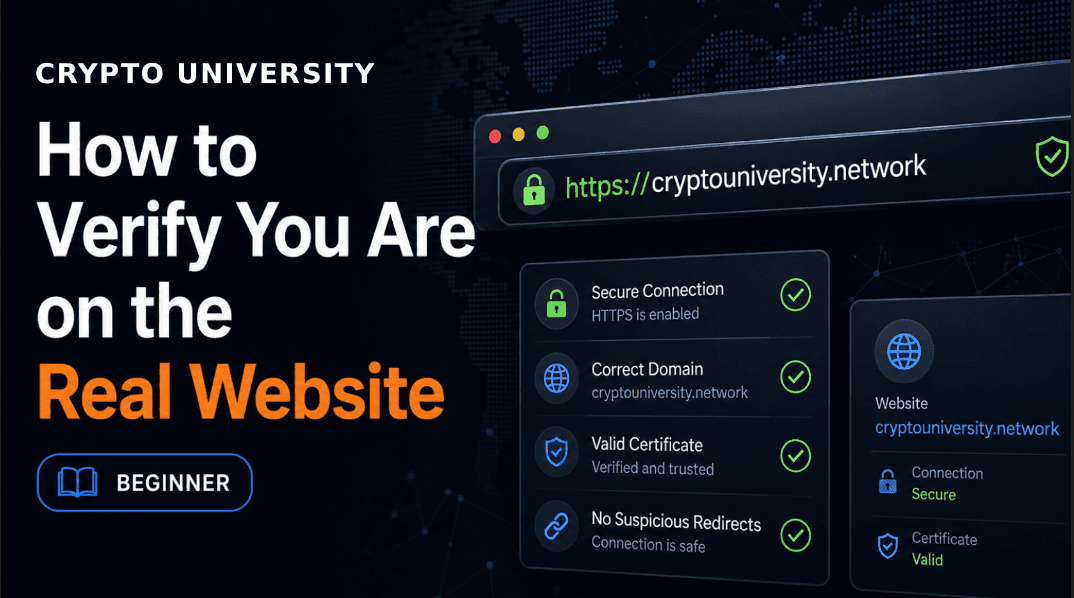
A certificate proves the connection is encrypted and that it matches the domain shown. It says nothing about who runs that domain. Certificates are free and issued in minutes, so a lookalike domain will have a padlock too.
5. Confirm across two independent sources
One official looking source can be faked. Two independent ones rarely agree by accident. Useful pairs include the project documentation and its public code repository, a long lived social account and a major data aggregator listing, or an exchange support page and the project blog. Prefer sources that cannot be bought with an advertising budget.
6. Judge the request, not the design
No legitimate website, wallet, or support agent needs your 12 or 24 word recovery phrase. There is no exception to this. Other strong signals include a page that opens a signature request the moment it loads, an approval for an unlimited amount you did not initiate, a request to move funds to a new address for safety, or urgent countdown language.
Check | What it proves | What it does not prove |
|---|---|---|
Padlock and HTTPS | The connection is encrypted and matches the domain displayed | That the domain belongs to the project you want |
Domain spelled correctly | You are not on a typosquatted address | That DNS records or the site code are uncompromised |
The site looks right | Nothing. One 2026 campaign copied the real app down to its page metadata and canonical tags | Anything at all |
A bookmark you saved earlier | You reached the address you intended to reach | Safety if the domain itself was hijacked at the registrar |
Wallet or extension warning | The domain is on a known blocklist | That an unflagged domain is safe, since new ones stay unlisted for hours |
When the real address is not safe
Two failure modes break the assumption that a correct URL equals a correct site. Both were visible in recent incidents.
Registrar level DNS hijacking. In May 2025 attackers reached Curve Finance through its domain registrar and pointed the address at a malicious server, while the smart contracts stayed untouched. An earlier hijack in 2022 was linked to roughly 570,000 dollars in losses. On 14 April 2026 security firm Blockaid flagged CoW Swap at about 14:54 UTC after domain records for swap.cow.fi and cow.fi were taken over at the registrar level and traffic was routed to a copy of the interface. The first public warning came around 15:41 UTC, a gap of roughly 47 minutes during which the correct URL served a wallet drainer. Reported loss estimates varied widely, from about 500,000 dollars to figures approaching 1 million dollars, and the protocol contracts were not affected.
Front end supply chain compromise. On 25 June 2026 Polymarket users lost an estimated 3 million dollars with no domain change at all. A third party vendor that supplied a script to the website was compromised, malicious JavaScript was served from the genuine site, and a small number of wallets approved fraudulent transactions before the dependency was removed. The company said it would reimburse affected users in full.
The practical lesson is that domain checking is necessary but not sufficient. It filters out the large volume of ad driven and lookalike attacks. It does not filter out infrastructure compromise, which is why the wallet is the last checkpoint that still belongs to you.
Wallet level defenses that catch what the browser misses
Read the hardware wallet screen. A hardware device shows the transaction it was actually asked to sign. If the browser says one thing and the device says another, believe the device.
Use transaction simulation. Several wallets and security extensions preview the expected balance changes in plain language before you confirm. An unexpected outgoing transfer is a stop signal.
Keep blocklists switched on. Open source and commercial phishing lists such as the one maintained by MetaMask, plus tools from Blockaid, Scam Sniffer and Wallet Guard, catch known bad domains. They rely on prior reports, so treat a clean result as no answer rather than a pass.
Separate your wallets. Use a low value wallet for anything new or unfamiliar and keep long term holdings in a wallet that never connects to fresh sites.
Do a small test first. A minimal transaction before a large one costs little and reveals a lot.
Review approvals on a schedule. Tools such as revoke.cash list outstanding token allowances so you can cancel the ones you no longer use.
If you think you interacted with a clone
Stop signing anything and close the tab. Do not retry on the same page.
Disconnect the wallet from the site in your wallet settings.
Revoke token approvals granted around that time, starting with the highest value assets, and check whether any delegation or permission has been set on the account.
Move remaining funds to a wallet whose keys have never touched that browser session, especially if you typed a recovery phrase anywhere.
Record transaction hashes, the exact URL, and the time. This is what security teams need to help.
Report the domain to a phishing database and to the project itself. Ignore anyone who messages you offering paid recovery. That is a second scam aimed at the same victim.
A 60 second routine you can repeat
Open the site from a bookmark. If there is no bookmark yet, get the link from documentation or a repository, verify it against one more independent source, then save it.
Glance at the address bar and read the domain from right to left. Check for xn-- and for extra words or hyphens.
Connect the wallet and read what is being requested, not what the page says it is doing.
Confirm on the hardware device screen where possible.
Close the tab when finished and review approvals periodically.
None of this is advanced. It is a checklist, and checklists work precisely because they do not depend on being alert on a bad day.
Frequently asked questions
Is the padlock icon enough to confirm a site is real?
No. It confirms the connection is encrypted and that the certificate matches the domain shown in the bar. Certificates are free and fast to obtain, so phishing sites almost always display a padlock. Treat it as a minimum requirement, never as verification.
Are sponsored search results safe if the visible URL looks correct?
Not reliably. Attackers have used high reputation hosting and layered redirects so that the address displayed in the ad looks legitimate while the final page is malicious. SEAL reported blocking hundreds of malicious crypto advertisement URLs during 2026 and advised users to avoid reaching crypto applications through search entirely.
Can I trust a link an AI assistant gives me?
Verify it before using it. Netcraft testing published in 2025 found that around a third of login URLs suggested by a widely used model family were not controlled by the brand in question, including unregistered domains that an attacker could later claim. Use AI answers to find a project name, then confirm the address through documentation or a repository.
What is punycode and why does it matter?
Punycode is the encoding that lets domain names contain non Latin characters. Attackers exploit it by registering names that look identical to a familiar brand while using different underlying characters. When a browser displays an address starting with xn--, the name contains such characters, which deserves close attention for a well known crypto brand.
The URL is correct but my wallet shows a warning. Which one is right?
Assume the warning is right and stop. Domain hijacking and script injection both produce exactly this situation: the correct address serving a malicious page. Check the project official channels before continuing, and revoke any approvals you already granted.
Does a hardware wallet make a clone site harmless?
It removes the risk of your keys being extracted, which is significant, but it does not stop you approving a harmful transaction. The protection comes from reading the device screen and refusing anything that does not match what you intended to do.
Related terms
Term | Definition |
|---|---|
Malicious code hosted on a phishing site that prompts a user into signing a harmful transaction so assets can be transferred quickly. | |
An attack that tricks a user into signing an approval such as permit, approve, or setApprovalForAll rather than stealing credentials. | |
Typosquatting | Registering misspelled versions of a well known domain so that mistyped or misread addresses land on an attacker controlled site. |
Punycode homograph attack | Registering a domain with visually similar characters from another alphabet, encoded in DNS with an xn-- prefix. |
DNS hijacking | Unauthorized changes to a domain name record, usually at the registrar, that send visitors of a correct address to a different server. |
Sources
Scam Sniffer, 2025 crypto phishing and wallet drainer annual report, January 2026
Security Alliance (SEAL), Malicious Google Ads Targeting Crypto, radar.securityalliance.org, 21 April 2026
Netcraft, research on large language models and phishing login URLs, July 2025
Cointelegraph and Decrypt reporting on the Curve Finance DNS incidents, May 2025
Unchained, Coinspeaker and Blockaid statements on the CoW Swap DNS hijack, April 2026
BleepingComputer, SecurityWeek and Halborn analysis of the Polymarket front end supply chain attack, June 2026
ESET and Huntress reference material on typosquatting, punycode and homograph attacks, 2026
Disclaimer: This article is educational information, not financial, legal or security advice. Figures cited are reported estimates from the sources listed and reflect the periods those sources cover. Security tools and project domains change over time, so verify current details with official project channels before acting.
Read More
How to Spot a Crypto Scam in 2026: The Complete Red Flag Checklist
The Crypto Anti-Phishing Checklist: 12 Habits That Stop Wallet Drainers in 2026
How Cross-Chain Bridges Work: A Security Guide for New Crypto Traders
Cross-Chain Bridges: A Plain-English Guide to How They Work and When to Avoid Them
Need deeper training?
Join our structured modules with live examples and expert checklists for effective implementation.
JOIN THE ACADEMY