Key Takeaways
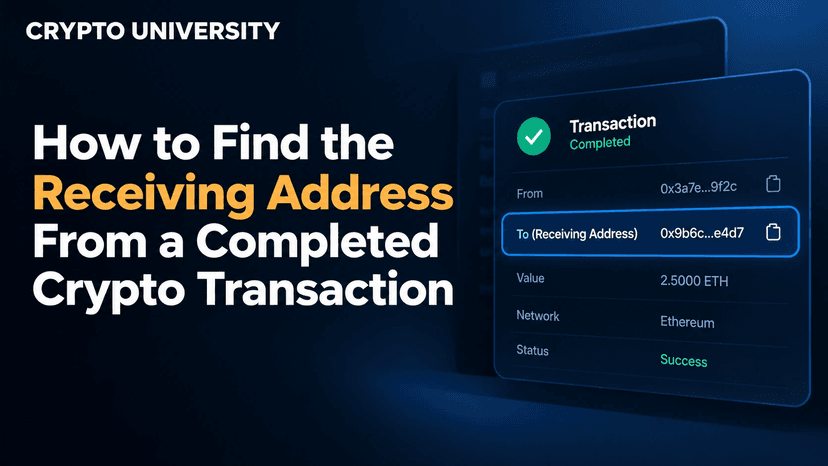
The transaction hash is your starting point. Paste it into the block explorer for the correct network, and the receiving address is recorded on the transaction page for anyone to see.
Where the recipient appears depends on the network and the asset. For a Bitcoin payment, read the outputs. For tokens such as USDT on Ethereum or TRON, read the token transfer section, not the "To" field.
Finding the address is only half the job. Compare every character with the address you meant to use, and check for a memo or tag if you sent to an exchange.
Why You Might Need the Receiving Address
Once a crypto transaction is confirmed, it is permanent and public. That is useful, because it means you can always go back and see exactly where your funds went, even if your wallet or exchange shows only a summary.
People usually look up a receiving address after the fact for one of these reasons:
Proving a payment to a seller, client, or friend who says nothing arrived.
Checking a mistake, such as a suspicion that funds went to the wrong address or the wrong network.
Answering a support request, since exchanges often ask for the destination address and transaction hash before they investigate a missing deposit.
Record keeping, for example matching transactions for tax reports or bookkeeping.
Checking for address poisoning, a scam where a lookalike address is planted in your history so you copy it by mistake.
What You Need Before You Start
Item | Why it matters | Where to find it |
Transaction hash (TXID) | The unique ID of the transaction you want to inspect | Wallet activity screen or exchange withdrawal history |
Network name | Each blockchain has its own explorer | Shown next to the transaction in your wallet or exchange |
Intended address | The address you meant to send to, for comparison | Your notes, invoice, or the recipient's deposit page |
Your own address (optional) | A backup way to find the transaction | Your wallet's receive screen |
If you lost the transaction hash, search your own wallet address on the explorer instead. The explorer lists every transaction that address has sent or received, so you can find the right one by its date and amount.
Step 1: Get the Transaction Hash
Most wallets and exchanges show the hash in the transaction details.
Self-custody wallets such as MetaMask or Trust Wallet show a "Transaction ID" with a copy button, plus a "View on block explorer" link that opens the correct explorer for you.
Exchanges list a TXID in the withdrawal history once the withdrawal has been broadcast to the network.
A transaction hash is usually a long string of letters and numbers. Ethereum and TRON style hashes are 64 hexadecimal characters, often starting with "0x" on Ethereum. Bitcoin TXIDs are also 64 characters, without the "0x". Solana signatures are longer and use a different character set.
Step 2: Open the Right Block Explorer
A block explorer is a free website that lets you search a public blockchain. Each network has its own, and a hash pasted into the wrong one will return nothing useful.
Network | Common explorers | What to search |
Bitcoin | mempool.space, Blockstream Explorer | TXID or address |
Ethereum | Etherscan | Transaction hash or address |
BNB Smart Chain | BscScan | Transaction hash or address |
Solana | Solscan, Solana Explorer | Transaction signature or address |
TRON | Tronscan | Transaction hash or address |
Layer 2 networks | Arbiscan, Basescan, Optimistic Etherscan | Transaction hash or address |
Paste the hash into the search bar and open the result. Check that the status says confirmed or success before reading anything else. A failed transaction did not move funds, apart from the network fee.
Step 3: Read the Receiving Address for Your Network
This is the step where most beginners get confused. The receiving address is not always in the field labeled "To."
Bitcoin and Other UTXO Coins
Bitcoin does not have a single sender and receiver. A transaction spends inputs (earlier amounts) and creates outputs (new amounts sent to addresses).
A typical payment has two outputs:
Output | Example | What it is |
Output 1 | 0.05 BTC to bc1q...7xk2 | The payment to the recipient |
Output 2 | 0.1495 BTC to bc1q...m4p9 | Change returning to the sender's wallet |
Your wallet automatically sends the leftover amount to a change address it controls, much like getting coins back after paying with a large note. To identify the recipient, look for the output whose amount matches what you meant to send. If you are not sure, your own wallet usually marks which address is yours. Litecoin, Dogecoin, and Bitcoin Cash work the same way.
Ethereum, BNB Smart Chain, and Layer 2 Networks
For a plain transfer of the network's own coin, such as ETH, the To field is the receiving address.
For tokens such as USDT or USDC, the To field shows the token contract, because your wallet sent an instruction to that contract asking it to move your balance. The real recipient appears further down in the token transfer section. On Etherscan, this section is listed as ERC-20 tokens transferred, and each line shows its own From, To, and amount.
What you sent | Where the recipient appears |
ETH, BNB, or another native coin | The "To" field |
A token such as USDT or USDC | The token transfer line, under "To" |
Native coin paid out by an app | The "Internal Transactions" tab |
If the transaction was a swap or used an app, you may see several token transfer lines. Look for the line that shows the token and amount you expected.
Solana
Solana stores token balances in separate token accounts that belong to a wallet. An explorer may show the token account address in a transfer rather than the main wallet address. When that happens, check the owner listed for that token account. The owner is the wallet address that actually controls the tokens.
TRON
TRON works much like Ethereum. A USDT payment on TRON (a TRC-20 transfer) is sent to the USDT contract, and the recipient appears in the token transfer details on Tronscan.
Step 4: Check for a Memo, Tag, or Comment
Some networks and exchanges use one address for many customers. They tell deposits apart using an extra field.
Network | Extra field name |
XRP Ledger | Destination tag |
Stellar | Memo |
Cosmos chains | Memo |
TON | Comment or memo |
BNB Beacon Chain (legacy) | Memo |
If the transaction went to an exchange on one of these networks, the receiving address alone does not identify your account. Find the tag or memo on the transaction page and compare it with the one shown on the exchange deposit screen.
Step 5: Verify the Address Carefully
Now compare the address on the explorer with the one you intended to use.
Check the full address, not only the start. Scam addresses are often created to match the first and last few characters of a real one.
Use copy and compare rather than reading by eye. Paste both addresses into a text editor, one above the other.
Confirm the network matches what the recipient expected.
For tokens, confirm the token contract matches the official one. A fake token can carry the name "USDT" while using a different contract.
Save the evidence. Keep the transaction hash and explorer link. A screenshot alone can be edited, but a hash can be checked by anyone.
Special Cases Where There Is No On-Chain Address
Not every transfer leaves a receiving address on a public explorer.
Situation | What you will see |
Transfer between two users on the same exchange | No transaction hash, because it is an internal ledger entry |
Lightning Network payment | An invoice and payment ID, not an on-chain address |
Exchange withdrawal still pending | No hash yet, because nothing has been broadcast |
Batched exchange withdrawal | One transaction with many outputs, so match yours by amount |
In these cases, the platform's own records are the main proof. Contact its support team with the details it provides.
What You Can and Cannot Learn From an Address
An explorer shows where funds went, but usually not who owns the address. Some explorers add labels for known services, such as a major exchange hot wallet, while most addresses have no name attached. If funds went to the wrong address, the explorer can confirm the mistake, but it cannot reverse the transaction. Only the owner of the receiving address can send funds back.
FAQ
Can I find the receiving address without the transaction hash?
Yes. Search your own sending address on the network's block explorer. Its transaction history lists every outgoing payment, and each one links to a page showing the recipient.
Why does the "To" field show a contract instead of the person I paid?
You probably sent a token. Token transfers are instructions sent to the token's smart contract, so the real recipient is listed in the token transfer section of the page.
Which output in my Bitcoin transaction is the recipient?
Usually the output that matches the amount you meant to send. The other output is typically change returning to your own wallet.
My exchange withdrawal came from an address I do not recognize. Is that normal?
Yes. Exchanges send withdrawals from their own shared wallets. The receiving address is the part you should check, since it should match your wallet.
Can a block explorer tell me who owns the receiving address?
Usually not. Some addresses carry labels for known exchanges or services, but most are not linked to a public identity.
Related Terms
Transaction Hash: A unique ID for a single blockchain transaction that anyone can search on a block explorer.
Block Explorer: A website that lets users search and view transactions, addresses, and blocks on a public blockchain.
Change Address: An address controlled by the sender's wallet that receives the leftover amount from a Bitcoin transaction.
Disclaimer
This article is for educational purposes only and is not financial, legal, or tax advice. Crypto transfers are usually irreversible, and wallet and exchange rules change over time, so always check the current requirements of the platforms you use before sending funds.
Sources