What Is TokenSniffer?
TokenSniffer is a free web based contract scanner. You paste a token contract address into the search box, and it runs a series of automated checks against that contract, then returns a report with a score from 0 to 100. A higher score means fewer detected risk signals.
The tool has been operated by Solidus Labs, a blockchain risk and market surveillance firm, since 2022. That matters for context: TokenSniffer is the retail facing front end of a compliance grade data pipeline, which is why the same detection engine is also sold to exchanges and wallets through a paid API.
The core question TokenSniffer tries to answer is narrow but useful. Does this contract contain code patterns that match known scams? It is not a formal audit, it does not assess whether a project is a good investment, and it cannot judge intent. Treat it as a first filter, not a verdict.
Supported Networks
TokenSniffer describes itself as supporting 15 chains. Coverage is mostly EVM compatible networks, with Solana as the main non EVM addition. The list below reflects the chains exposed by the public API at the time of writing.
Network | Type | Notes |
|---|---|---|
Ethereum | EVM | Deepest coverage and the original target chain |
BNB Smart Chain | EVM | High volume of new token launches |
Base | EVM L2 | Heavily used for newer token deployments |
Arbitrum | EVM L2 | Standard ERC-20 checks apply |
Optimism | EVM L2 | Standard ERC-20 checks apply |
Polygon | EVM | Widely supported by DEX data sources |
Avalanche | EVM | C-Chain tokens |
Solana | Non EVM | SPL tokens, added after the EVM chains |
Others | EVM | Includes Fantom, Cronos, Gnosis, Blast, KCC, Oasis and Harmony |
Newer non EVM chains such as Sui, Aptos and TON are not covered. If you trade on those networks you will need a chain specific scanner. Chain support changes over time, so confirm the network selector on the site before you trust a result. The same ticker can exist on several chains, and scanning the wrong one returns empty or misleading output.
Main Features
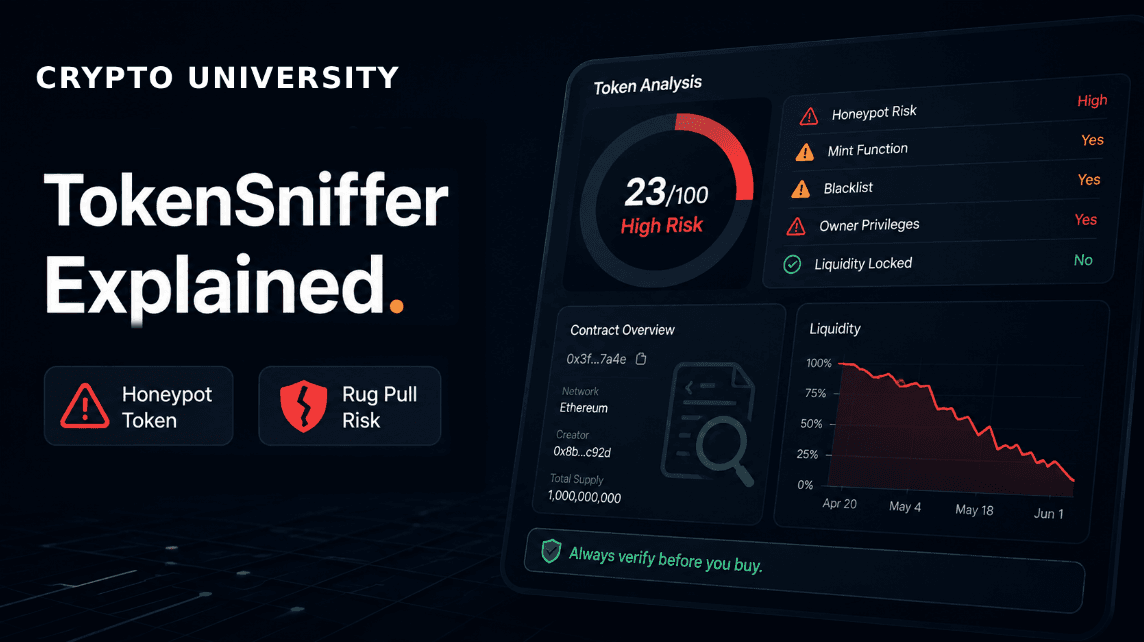
Smell Test score. An automated audit expressed as a number from 0 to 100, assembled from four groups of checks covering swaps, contract code, holder distribution and liquidity.
Honeypot detection. The scanner simulates a small buy followed by an immediate sell. If the sell reverts, the token is flagged. This is the single most practical check the tool performs, because honeypots are designed to look normal until you try to exit.
Scam pattern matching. TokenSniffer compares both source code and compiled bytecode against a large internal library of known scam patterns. Its documentation cites more than 10,000 patterns collected over several years of research.
Contract permission checks. Flags features such as mint functions, ownership that has not been renounced, and transfer or balance modifiers that let a deployer restrict selling.
Liquidity analysis. Reports pool size and whether liquidity appears locked or burned, plus how long any lock runs.
Holder concentration. Shows top holders and whether a small number of wallets could move the price by exiting.
Fee visibility. Displays detected buy and sell taxes, which is where many soft rug designs hide.
Scam and hack listings. A running feed of flagged tokens and addresses, also available through the API.
Solidus Labs states that its systems monitor tens of thousands of newly created contracts per day and classify a majority of newly deployed tokens as scams. That figure is the company's own reported estimate rather than an independently verified number, but it does illustrate the base rate problem: most new tokens fail these checks.

Set Up Guide: Running Your First Scan
There is no account, no wallet connection and no browser extension required. The entire flow is read only.
Copy the token contract address from a source you trust. The safest sources are a block explorer such as Etherscan or BscScan, or an official project page you navigated to directly. Do not copy addresses from chat groups or replies.
Type tokensniffer.com into your browser manually. Cloned scanner interfaces exist, and any site that asks you to connect a wallet or sign a message to run a scan is not a scanner.
Select the correct network in the chain selector, then paste the contract address and run the scan. You may need to clear a CAPTCHA, which exists to stop bots from scraping the free interface.
Read the Smell Test result before the score. A red honeypot flag is disqualifying on its own, regardless of how the rest of the report looks.
Work down the individual checks. Look at buy and sell fees, ownership status, liquidity lock, and the top holder table rather than stopping at the headline number.
Cross check anything that matters. Open the contract on the chain's block explorer and confirm the same facts independently. If the result is borderline, run the address through a second scanner and compare.
One common source of confusion: TokenSniffer expects a token contract address, not a personal wallet address. Pasting your own wallet will not produce a useful report. For wallet level analysis you need a different category of tool.
How to Read the Score Without Fooling Yourself
A high score means the automated tests did not find the patterns they look for. It does not mean the token is safe. Automated scanners can miss upgradeable proxies, externally controlled logic, and malicious behaviour that only activates later. A contract can be technically clean and still be abandoned by its team a week after launch.
A low score is more informative than a high one. False positives happen, especially with brand new launches that have not yet verified source code, renounced ownership or locked liquidity. But a low score reliably tells you there is something to investigate, and the report tells you exactly what triggered it.
The practical rule is that TokenSniffer is good at ruling things out and weak at ruling things in.
Fees
Tier | Cost | What You Get |
|---|---|---|
Web interface | Free | Unlimited manual scans, no account required, CAPTCHA gated |
Sniffer Pack Pro | 99 USD per month | API access, roughly 500 unique token requests per day, trial available on request |
Enterprise Pack | Contact for pricing | 5,000 or more requests per day, malicious token and address feeds, historical data at extra cost |
Pricing reflects publicly listed figures at the time of writing and can change. Individual users checking one token at a time pay nothing.
Pros and Cons
Pros
Free, instant and requires no wallet connection, which removes an entire category of risk from the research process.
Honeypot simulation is genuinely useful and catches the most common trap for beginners.
Reports break down individual checks rather than only showing a number, so users can learn what the signals mean.
Cons
It is not an audit. Automated pattern matching cannot evaluate custom logic, team behaviour or off chain risk.
Chain coverage stops short of newer non EVM ecosystems such as Sui, Aptos and TON.
Accuracy drops on upgradeable proxies and unusual token designs, sometimes returning no score at all.
Frequently Asked Questions
Is TokenSniffer free?
Yes. The web interface is free and does not require an account. Paid tiers exist only for programmatic API access.
What does the 0 to 100 score mean?
It is an automated audit score where higher means fewer detected risk signals. It is built from swap, contract, holder and liquidity checks. It is not a safety guarantee.
Can TokenSniffer detect honeypots?
Yes. It simulates a buy and then a sell against the contract. If the sell fails, the token is flagged.
Does a score of 100 mean a token is safe?
No. It means the automated tests found nothing they were built to detect. Malicious behaviour can be added later, hidden behind proxies, or executed off chain by the team.
Do I need to connect my wallet?
No, and you should not. Any scanner that asks you to connect or sign is a red flag.
Which chains does it support?
Around 15 chains, mostly EVM networks including Ethereum, BNB Smart Chain, Base, Arbitrum, Optimism, Polygon and Avalanche, plus Solana. Confirm the current list on the site.
Is TokenSniffer enough on its own?
No. Use it as a first pass, then verify on a block explorer and, where the stakes justify it, a second scanner.
Related Terms
Disclaimer: This article is educational and does not constitute financial advice. Tool features, chain coverage and pricing change over time. Verify current details on the official site before relying on them. Nothing here is a recommendation to buy or sell any asset or use any platform. Do your own research and manage your risk.
Additional reading
Chainlist: How to Find Chain IDs and Add EVM Networks to Your Wallet
Rugcheck Explained: How to Spot Scam Tokens on Solana in 2 Minutes
What is Arkham Intelligence? Crypto Wallet Investigation Explained
How to Use AI Tools for Crypto Research in 2026?
GoPlus Security Explained: Multi-Chain Token and Wallet Risk Checks