What Birdeye Is
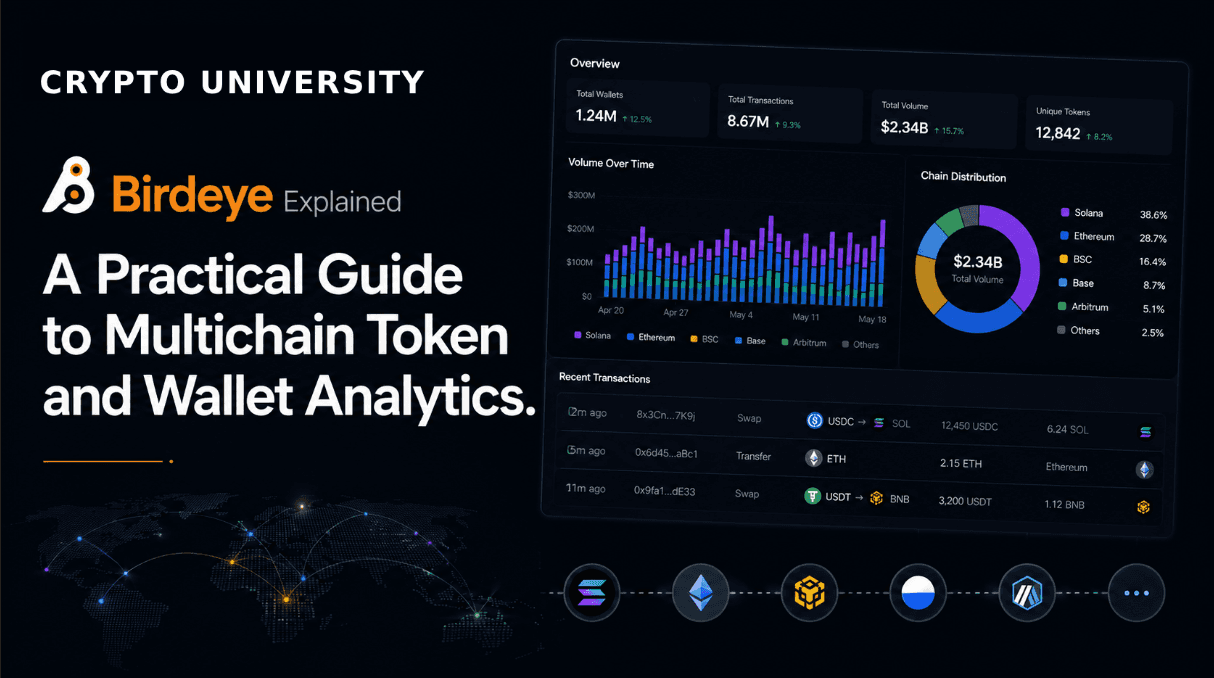
Birdeye is an on-chain market data platform. It gathers trading activity from decentralized exchanges across multiple blockchains and presents it as token pages, price charts, wallet profiles and liquidity breakdowns. It is widely reported to have launched in 2021, founded by Kha Nguyen, previously head of product at the Solana block explorer Solscan.
Its earliest and deepest coverage is on Solana, which is why it is commonly described as a Solana analytics tool. Coverage has since expanded to a range of other networks.
The core idea is aggregation. A single token often trades in many separate liquidity pools spread across several decentralized exchanges. Looking at one pool gives an incomplete picture of price, volume and depth. Birdeye combines pool level data into a token level view, then lets you drill back down into an individual pool when you need precision.
Important framing: Birdeye is a research and monitoring tool. It reports what has already happened on-chain. It does not forecast prices, and nothing displayed on the platform should be treated as financial advice.
Supported Networks
Birdeye's public API documentation lists the networks below. Coverage in the web app and mobile app can differ slightly from API coverage, and networks are added over time, so always check the official documentation for the current list.
Network | Birdeye API Parameter | Category |
|---|---|---|
Solana | solana | Non-EVM, deepest coverage |
Ethereum | ethereum | EVM Layer 1 |
BNB Smart Chain | bsc | EVM Layer 1 |
Avalanche C-Chain | avalanche | EVM Layer 1 |
Polygon | polygon | EVM |
Base | base | EVM Layer 2 |
Arbitrum | arbitrum | EVM Layer 2 |
Optimism | optimism | EVM Layer 2 |
zkSync Era | zksync | EVM Layer 2 |
Monad | monad | EVM |
MegaETH | megaeth | EVM |
Sui | sui | Non-EVM, partial endpoint support |
Aptos | aptos | Non-EVM |
Fogo | fogo | Non-EVM |
One caveat worth knowing: Sui support is partial. Birdeye's documentation notes that wallet endpoints, token security checks and token creation data are not available for Sui, and that market cap and supply figures may be missing from token overview responses.
On exchange coverage, Birdeye's documentation cites data from more than 180 decentralized exchanges and automated market makers, including Jupiter, Raydium, Orca and Meteora on Solana, and Uniswap, PancakeSwap and 1inch on EVM chains. Other Birdeye listings quote higher counts of 200 to 300 venues, so treat exact numbers as approximate and changing.
Main Features
Token pages and charts
Each token has a page showing aggregated price, trading volume, liquidity, holder counts and transaction history. You can view statistics combined across every pool, or switch to a single market for pool specific figures. This distinction matters, because a token can look thinly traded on one venue and active overall.
Wallet and trader analytics
Birdeye builds profiles for individual wallet addresses, showing holdings, trade history, realised and unrealised profit and loss, and activity over selected time windows. Filters and tagging are used to separate likely automated bot activity from other trading. This is the feature most often referred to as smart money tracking.
Watchlists and alerts
You can save tokens and wallets to custom watchlists and compare them side by side. Alerts can be configured for price movements, new listings and large transactions, and delivered through the app or supported bot integrations.
Token security checks
Birdeye surfaces basic contract level risk indicators such as mint authority status, freeze authority, liquidity pool conditions and holder concentration. Treat this as an automated screening layer that flags obvious structural risks. It is not a security audit and it cannot detect every form of manipulation.
Launchpad and new token tracking
The platform monitors newly created tokens and activity across a range of launchpads. This is genuinely useful for research into how new issuance behaves, and it is also the highest risk corner of the product, because new tokens have short histories and shallow liquidity.
Data API for developers
Birdeye Data Services provides REST endpoints and WebSocket streams covering prices, OHLCV candles, trades, wallet data and market metrics. Developers use it to feed dashboards, bots, portfolio trackers and research tools. Usage is metered in compute units rather than a flat request count, because endpoints differ in cost.
Set Up Guide
Using the web and mobile app
Open the platform. Open birdeye.so in a browser, or install the mobile app from the official App Store or Google Play listing. Verify the developer name before installing, since analytics tools are a common target for imitation apps.
Choose your network. Use the network selector to switch between Solana, Ethereum, Base and the other supported chains. Data is chain specific.
Find a token. Search by ticker or, more reliably, by full contract address. Tickers are not unique and can be duplicated deliberately. Copy the contract address from an official project source rather than from search results or social media.
Read the token page. Toggle between the aggregated token view and individual pool views to see where liquidity actually sits.
Connect a wallet if you want portfolio tracking. Connecting a wallet is optional and enables portfolio tracking. A read only connection does not move funds, but only connect wallets you are comfortable exposing, and never enter a seed phrase into any website.
Build a watchlist and set alerts. Save tokens and wallets you want to monitor, then configure alerts for the conditions you care about.
Getting an API key
Register. Create an account on the Birdeye Data Services dashboard at bds.birdeye.so.
Generate a key. Generate an API key from the dashboard and send it in the X-API-KEY request header.
Start on the free tier. Begin on the free Standard package to test endpoints, then upgrade once you understand your compute unit consumption.
Monitor usage. Track usage in the dashboard metrics view so overage charges do not surprise you.
Fees
Birdeye's core web interface is free to browse. Paid tiers cover advanced platform features and programmatic data access. Figures below reflect Birdeye's published documentation at the time of writing and are subject to change.
Birdeye Pro subscription
Plan | Published Price | Notes |
|---|---|---|
Free | $0 | Browsing, charts, basic token and wallet data |
Pro monthly | $45 per month | Short term access to advanced features |
Pro quarterly | $120 per quarter | Roughly $40 per month equivalent |
Pro yearly | $360 per year | Roughly $30 per month equivalent |
Payment is accepted in fiat through Stripe, or in cryptocurrency on Solana, Ethereum and Polygon. Note that the Pro pricing page was last updated some months before this article was written, so verify current rates before subscribing.
Birdeye Data Services API packages
Package | Base Price | Included Compute Units | Rate Limit | Extra per 1M CUs |
|---|---|---|---|---|
Standard | Free | 30,000 | 1 rps | Not available |
Lite | $39 | 1.5 million | 15 rps | $23 |
Starter | $99 | 5 million | 15 rps | $19.90 |
Premium | $199 | 15 million | 50 rps | $9.90 |
Business | $499 | 60 million | 100 rps | $6.90 |
Business B-15 | $899 | 150 million | 150 rps | $4.50 |
Business B-30 | $1,350 | 300 million | 150 rps | $4.50 |
Business B-50 | $2,050 | 500 million | 150 rps | $3.50 |
Growth AutoScale | From $699 | From 100 million | 150 rps | Tiered |
Enterprise | Custom | Custom | Custom | Custom |
Monthly cost equals the base price plus any overage on compute units consumed beyond the included allowance. Prices are quoted in US dollars and Birdeye states they may change.
Separate from subscriptions: if you execute a swap through the interface, you also pay the underlying blockchain network fee and any fee charged by the routing aggregator or liquidity venue. These are not Birdeye subscription costs.
Limitations and Risks to Understand
Data describes the past. On-chain data is descriptive, not predictive. Volume spikes, holder growth and wallet inflows describe what already happened. They do not establish that a pattern will continue.
Wallet copying is not a strategy. A wallet with strong historical returns may be running a strategy you cannot see, may have a different risk tolerance, and may be exiting a position while you are entering it. Visible trade history is not a strategy.
Security checks are screens, not audits. Automated risk flags catch structural problems like retained mint authority. They cannot verify a team, detect off-chain agreements or judge whether a project is legitimate.
Data quality varies. Aggregators can be manipulated by wash trading and artificial volume, particularly on low liquidity tokens. Cross-check unusual readings against a block explorer or a second data source.
Coverage is uneven. Newer or non-EVM chains may have reduced endpoint support and less complete historical data than Solana or Ethereum.
Rating
4.2 / 5
Birdeye scores well on breadth of data, depth of Solana coverage, and the quality of its developer API relative to price. Points are deducted for uneven coverage across newer chains, an interface that assumes a fair amount of prior knowledge, and documentation pages that are not always kept current. Beginners will find the token pages readable but the wallet analytics harder to interpret correctly. This rating reflects the tool's usefulness as a research instrument and is not a comment on any asset shown inside it.
Pros and Cons
Pros | Cons |
|---|---|
Aggregates data across many pools and exchanges, giving a fuller picture than single pool charts | Interface density and jargon can overwhelm beginners, with limited in-product explanation |
Genuinely strong Solana coverage, including new token and launchpad activity | Feature set encourages fast reactive behaviour, which is a poor fit for most new users |
Usable free tier plus a well documented API with a free developer package | Coverage and endpoint support are inconsistent across non-EVM and newer chains |
Frequently Asked Questions
Is Birdeye free to use?
Yes. The web interface is free to browse, and the API has a free Standard package with a limited compute unit allowance. Advanced platform features and higher API limits require a paid plan.
Is Birdeye only for Solana?
No. Solana is where its coverage is deepest and where it started, but it supports Ethereum, Base, BNB Smart Chain, Arbitrum, Optimism, Polygon, Avalanche, zkSync Era and several non-EVM networks including Sui and Aptos.
Do I need to connect a wallet?
No. Browsing token data, charts and wallet profiles does not require a connection. Connecting a wallet enables portfolio tracking and in-app swaps. Never enter a seed phrase on any website.
What is the difference between Birdeye and a block explorer?
A block explorer shows raw transactions and account state for a single chain. Birdeye interprets that activity as market data, aggregating trades across pools and chains into prices, volumes and profit and loss figures.
What is a compute unit?
It is Birdeye's billing measure for API usage. Different endpoints consume different numbers of compute units depending on how demanding they are, so cost tracks workload rather than a flat request count.
Can Birdeye tell me which tokens will go up?
No. It reports historical and live on-chain activity. No analytics platform can determine future prices, and treating any metric as a signal carries real risk of loss.
Is the token security check reliable?
It reliably flags specific structural conditions such as mint authority or holder concentration. It cannot assess a team, an off-chain arrangement or overall legitimacy, so it should never be treated as an all clear.
Related Terms
Term | Meaning |
|---|---|
DEX aggregator | A service that sources pricing and routing across multiple decentralized exchanges |
Liquidity pool | A pooled reserve of two or more tokens that enables automated on-chain trading |
AMM | Automated market maker, a formula based mechanism that prices trades against a pool |
OHLCV | Open, high, low, close and volume, the standard data structure behind candlestick charts |
PnL | Profit and loss, the realised or unrealised gain or loss on a position |
Mint authority | The permission to create additional units of a token after launch |
Holder concentration | The share of a token's supply controlled by its largest addresses |
Compute unit | A usage based billing measure for API calls, weighted by endpoint cost |
Smart money tracking | Monitoring wallets with strong historical performance, a descriptive label rather than a verified status |
Where to Go Next
Resource | Link |
|---|---|
Official website | |
Developer platform | |
Documentation |
Disclaimer: This content is for educational and informational purposes only and is not financial advice. Nothing here is a recommendation to buy or sell any asset or use any platform. Do your own research and manage your risk.
Revoke.cash: How to Check and Revoke Token Approvals to Protect Your Wallet
Chainlist: How to Find Chain IDs and Add EVM Networks to Your Wallet
Cryptocurrency Payment Gateways for Beginners: BTCPay Server Explained
Bubblemaps Review: How to Read Token Holder Bubble Maps
DEX Screener Explained: How to Track DEX Pairs, Liquidity & Prices