Dollar-cost averaging (DCA) is a method of crypto-automated trading in which a trader spreads out the entire amount to be traded across several regular purchases of a particular coin, regardless of its price in the crypto market. This can help reduce the effect of volatility on the entire crypto held.
Traders who prefer crypto-automated trading can use a DCA bot to automatically buy and sell crypto at predetermined timeframes. The rationale behind the DCA bot trading strategy is that, over time, the average cost of the asset you buy with the bot will be lower than it would have been if you had attempted to purchase it all at once at the lowest available price.
3Commas is a good trading bot that you can use for DCA strategy. It is a well-known crypto trading bot that helps to schedule trades on a variety of exchanges, including OKX. With 3Commas, you don't have to code your own bot. You would use the bot's user interface to set up the recurring buy orders.
Here is a step-by-step crypto automated trading course on how to connect the 3Commas DCA bot with OKX exchange for trading.
Step 1
Create a 3Commas account and log in to the platform. Once you have signed up, you will need to verify your email address and complete the necessary verification processes.
Step 2
Select OKX from the supported exchanges list in the "Exchange" section of the 3Commas platform. For your OKX account to be connected to 3Commas, you must provide your OKX API key and secret.
Step 3
Log into your OKX cryptocurrency exchange account and go to the "API Management" page in your account settings to create an API key on OKX. Choose a name for the API key and select the "Trade" permission to generate a new API key, Kindly note that the bot won't be able to execute transactions on your behalf without allowing the “Trade permissions" in the settings.
It's also very important to remember that you must keep your API key and secret private and must keep them in a safe place.
Step 4
Once you have generated your API key on OKX, enter the key and secret in the appropriate fields on the 3Commas platform and select "Connect". By doing this, 3Commas will have access to your OKX exchange account and be able to execute trades on your behalf.
Step 5
Once your OKX account is linked, you can create a new "DCA" bot under the 3Commas platform's "SmartTrade" section.

source: goodcrypto.app
Step 6
Enter the digital asset you wish to use for DCA, the amount, and the frequency of purchases in the bot settings. For example, if you want to buy $100 in Bitcoin every week, you can specify that you want to use Bitcoin as the digital asset. Add $100 as the amount and set the interval for the purchases to be weekly.

source: goodcrypto.app
In the advanced settings, you can set a stop-loss for your trade. For example, 10% below the purchase price or set a target sell price of 20% above the purchase price.
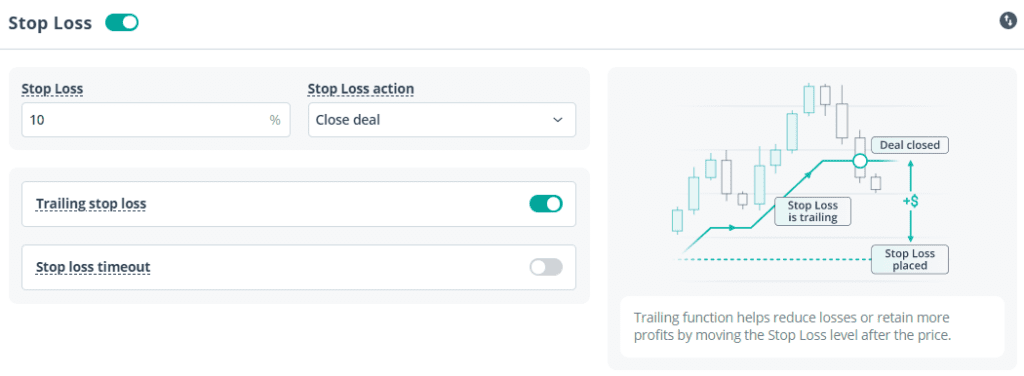
source: 3commas.io
Once you've set up the bot, it will automatically place buy orders for you at the predetermined period, such as $100 worth of Bitcoin every week, regardless of the price. You can monitor your bot's performance in the "SmartTrade" section of your 3Commas account and make adjustments as needed.
It's important to keep in mind that the process of setting up 3Commas on OKX crypto exchange may vary depending on the version of 3Commas you are using. Make sure to consult the platform's documentation or support team for specific instructions if you have any trouble setting up the bot.
In addition, using a crypto trading bot to implement DCA is subject to some risks, such as the bot malfunctioning and not placing the orders correctly, the bot being hacked, etc. Hence, ensure to monitor your trades and make adjustments as needed. Don't forget that there are risks involved with any crypto asset. Also, make sure that you have a good understanding of how 3Commas or any other bot works before using it. As always, please do your own research and make sure that you are comfortable with the risks involved in crypto before committing your money.
If you want to learn more ways to automate your trading with trading bots, join the Crypto University membership today
Video tutorial on Crypto Automated Trading
Here is a helpful video guide by Crypto University – your Crypto trading advisor that shows you how to set up a DCA bot to trade on OKX as well. Find more free trading courses on Youtube:
Join our crypto community on Twitter, discord, Facebook and Instagram to stay updated with crypto trends.